
Description
At a glance
Multiple Themes v7.1.1 — free WordPress plugin download. Key facts: 10K+ active installs · 4.7/5 rating from 50 reviews · updated March 6, 2025 · requires WordPress 3.4+.
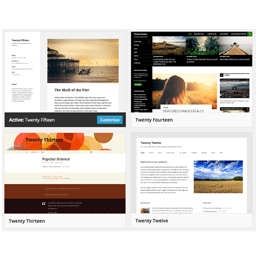
Settings provide many different ways to Select which Theme should appear where on your WordPress web site:
- Just for Site Home
- By URL (Version 5 adds support for Query keyword=value as part of a unique URL);
- By Prefix URL, matching all URLs that begin with the same characters (“Prefix URL”);
- By Wildcard Prefix URL with one or more Asterisks (“*”) representing arbritrary subdirectories in the URL;
- By Query Keyword found in any URL, not matter what the Value;
- By Query keyword=value found in any URL;
- By Sticky Query keyword=value that sets the Theme for a given Visitor until an Override Query keyword=value is found in a future URL (Advanced Setting requiring the Visitor’s browser to accept Cookies; incompatible with certain plugins that block Cookies);
- Everywhere (Advanced Setting that overrides the WordPress Active Theme);
- All Pages (Advanced Setting that works with most, but not all, Themes and Plugins);
- All Posts (Advanced Setting that works with most, but not all, Themes and Plugins).
None of the Themes in the WordPress Theme Directory alter the appearance of the WordPress Admin panels. As a result, this plugin does not allow Theme Selection entries to specify URLs for WordPress Admin panels.
Use with Paid Themes: On-going full scale testing of Themes by this plugin’s author is only possible if the Theme is found in the WordPress Theme Directory. Although (Version 5 of) this plugin should now work with all Themes, any problems encountered while using Paid Themes will be difficult to diagnose. As described in the FAQ tab, a WordPress Network (Multisite) is an alternative to this plugin, as a way to create a single web site with more than one Theme.
A similar situation exists with Paid Plugins.
Use with Plugins that Cache: You may find that you have to flush the Cache whenever you change Settings in the jonradio Multiple Themes plugin. Some Caching plugins only cache for visitors who are not logged in as users, so be sure to log out before testing the results of your jonradio Multiple Themes settings.
Changing Theme Options (Widgets, Sidebars, Menus, Templates, Background, Header, etc.)?: After installing and activating the plugin, see the plugin’s Settings page and click on the Theme Options tab for important information on changing Options for Themes other than the Active Theme.
How it Works: The plugin does not change the Active Theme defined to WordPress in the Appearances-Themes Admin panel. Instead, it dynamically (and selectively) overrides that setting. Which means that simply deactivating (or deleting) this plugin will restore the way that Themes were displayed prior to installing this plugin. However, in some situations, it is possible to inadvertently alter Theme Options for the Active Theme when using either of the Methods described on the plugin’s Setting page Theme Options tab.
Adoption Notice
Special thanks to Jon ‘jonradio’ Pearkins for creating the plugin and making adoption possible.
Frequently asked questions
What is Multiple Themes?
Multiple Themes is a free WordPress plugin available under the GPL license. The current version is 7.1.1. It is active on over 10K websites.
Is Multiple Themes free to download?
Yes — Multiple Themes 7.1.1 is a free GPL download with no hidden fees, no account needed, and no feature locked behind a paywall in this package. Users rate it 4.7 out of 5 based on 50 reviews.
How do I install Multiple Themes 7.1.1?
Download the ZIP file from this page, then in your WordPress dashboard go to Plugins → Add New → Upload Plugin, choose the file, click Install Now, then Activate. The plugin works immediately after activation — no license key or extra setup is required for the core features.
What are the requirements for Multiple Themes?
Multiple Themes 7.1.1 requires WordPress 3.4 or higher. Most modern WordPress hosts already meet these versions. Running older versions may cause features to break, so update WordPress and PHP first if your site is behind.
When was Multiple Themes last updated?
Version 7.1.1 was last updated on March 6, 2025. This page is refreshed automatically, so the download here always matches the newest version we have verified.
Is the Multiple Themes download safe?
The file is sourced directly from the official WordPress.org repository — the same file the developer published. It is served unmodified, so what you install here is byte-identical to the official release.
Version: 7.1.1
Updated: October 1, 2026
Technical details
| Version | 7.1.1 |
|---|---|
| Last updated | March 6, 2025 |
| Active installs | 10,000+ |
| Rating | ★★★★★ 4.7/5 (50 reviews) |
| Requires WordPress | 3.4 or higher |
| Author | miabou |
| Tags | sections, style, template, theme, themes |
Demo Multiple Themes
Download Multiple Themes
Download Multiple Themes WP PluginNote: if the download does not start, disable your ad blocker and try again.