
Description
At a glance
Looking for Tabby Responsive Tabs v1.4.1? It is available here as a free GPL download for WordPress — 10K+ active installs · 4.9/5 rating from 144 reviews · updated August 17, 2025 · requires WordPress 4.9+ & PHP 5.6+.
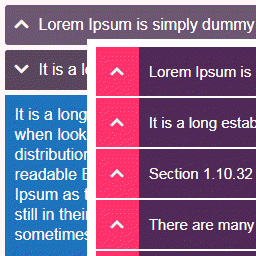
- Adds a set of horizontal tabs which changes to an accordion on narrow viewports
- Tabs and accordion are created with jQuery
- Supports multiple sets of tabs on same page
- Uses semantic header and content markup
- Aria attributes and roles aid screen reader accessibility
- Tabs and content are accessible via keyboard
The Tabby responsive tabs plugin is designed to be an easy and lightweight way to add responsive tabs to your content. Experienced developers should be able to easily customize how the tabs display on their site by replacing the built-in CSS rules with an edited version (see note below for more details of this).
Optional Add-ons
The Tabby responsive tabs customiser add-on adds a settings panel with several parameters to provide the easiest way to customise the display of your tabs without editing any code. You can use the default tabby styles or one of the included one-click presets as a starting point for customisation. It also enables you to easily add icons to your tab titles.
The Tabby link to tab add-on provides a simple shortcode to create links to specific tabs which can appear anywhere on the same page as the tabgroup without the page reloading.
The Tabby tab to URL link add-on enables you to set one or more of your tabs to act as a link to any URL.
The Tabby load accordion closed add-on changes the default behaviour when the tabs are displayed as an accordion so that no accordion sections are open when the page initially loads.
The Tabby reopen current tab on reload add-on enables the currently active tab to remain the active (open) tab after the page has been reloaded/refreshed.
Usage:
There are two shortcodes used to create the tab group: [tabby] and [tabbyending] both must be used as below to create a tab group.
To start a new tab use a [tabby] shortcode, eg:
[tabby title="tabname"]
replace tabname with the name of your tab.
Add the tab content after the shortcode.
Add a [tabbyending] shortcode after the content of the last tab in a tabgroup.
Example
If you copy & paste this example into your own page instead of typing them, ensure that you delete any stray <code> or <pre> tags that might have appeared.
[tabby title="First Tab"]


This is the content of the first tab.


[tabby title="Second Tab"]


This is the content of the second tab. This is the content of the second tab.


[tabby title="Third Tab"]


This is the content of the third tab. This is the content of the third tab. This is the content of the third tab.


[tabbyending]
note: To prevent stray paragraph tags being introduced by WordPress’s wpautop filter, ensure that there is a blank line above and below each tabby shortcode and the tabbyending shortcode.
You can see the tabs on the demo page.
You can add the shortcodes to a page made using the WordPress block editor by using WordPress’s shortcode block.
If you want to change how the tabs and accordion display on your site, you have two options:
-
Use the Tabby Responsive Tabs Customiser plugin which provides a very easy way to customise the display of your tabs without needing to edit any code.
-
Copy the contents of the plugin’s stylesheet into your child theme or custom styles plugin and make the changes to that copy as required. If you do this you will also need to prevent the built-in styles from loading by going to the admin page at settings => tabby and unchecking the “Include the default tabby stylesheet” checkbox.
Additional Shortcode attributes
Open
The first (leftmost) tab panel will be open by default in ‘tab view’ and in ‘accordion view’.
If you want a specific tab other than the first tab to be open by default when the page first loads, you can add the parameter & value open=”yes” to the shortcode for that tab:
[tabby title="My Tab" open="yes"]
If you use the ‘open’ shortcode parameter in one of your tab shortcodes, ensure that you only add it to single tab as having more than one tab open within a tab group is not supported.
Icon
The markup required to show an icon alongside a tab title can be added by using the ‘icon’ attribute. Tabby responsive tabs does not add the icon files, you will also need to use a theme or plugin (such as the tabby responsive tabs customiser add-on) to add the icon files:
[tabby title="My Tab" icon="cog"]
This adds a pseudo element before the tab title with the classes “fa” and “fa-cog”. Other icon font sets can be used if you ensure the CSS rules target the classes added by the plugin.
The Tabby Responsive Tabs Customiser plugin can be used to add the Font Awesome files required to display the icons in the tab titles.
Class
This allows a custom class to be added to each tab and tab content area. The class added to the tab will be the value of the class parameter and the class of the tab content area associated with that tab will be the class with the ‘-content’ suffix.
Controlling which tab is open when linking to the page
You can use a ‘target’ URL parameter in your link to set which tab will be open when the page initially loads. The value of this parameter is based on the tab title specified in the tabby shortcode which built the tab, but formatted with punctuation & special characters removed, accents removed, and with dashes replacing the spaces.
If you want to link to a ‘contacts’ page with a tab titled ‘Phone Numbers’ open, the url you use to link to this page would look like:
yoursite.com/contact/?target=phone-numbers
If you want a tab with the title ’email addresses’ to be open, the url would look like:
yoursite.com/contact/?target=email-addresses
If you want a tab with the title ‘entrées’ to be open (with an acute accent over the second e), the url would look like:
yoursite.com/contact/?target=entrees
Using a target url parameter will override any open shortcode parameters used.
Frequently asked questions
What do I get when I download Tabby Responsive Tabs?
Tabby Responsive Tabs 1.4.1 is the latest version. It is a WordPress plugin you can download here free of charge under the GPL license, with the complete feature set included and no trial limitations. It holds a 4.9/5 rating from 144 user reviews.
Does Tabby Responsive Tabs cost anything?
No. Tabby Responsive Tabs 1.4.1 is 100% free — the full GPL version, not a trial or demo. There are no download limits, no accounts to create, and no upsells during the download.
How do I install Tabby Responsive Tabs 1.4.1?
Download the ZIP file from this page, then in your WordPress dashboard go to Plugins → Add New → Upload Plugin, choose the file, click Install Now, then Activate. The plugin works immediately after activation — no license key or extra setup is required for the core features.
What are the requirements for Tabby Responsive Tabs?
Tabby Responsive Tabs 1.4.1 requires WordPress 4.9 or higher and PHP 5.6 or higher. Most modern WordPress hosts already meet these versions. Running older versions may cause features to break, so update WordPress and PHP first if your site is behind.
When was Tabby Responsive Tabs last updated?
Version 1.4.1 was last updated on August 17, 2025. This page is refreshed automatically, so the download here always matches the newest version we have verified.
Is the Tabby Responsive Tabs download safe?
The file is sourced directly from the official WordPress.org repository — the same file the developer published. It is served unmodified, so what you install here is byte-identical to the official release.
Version: 1.4.1
Updated: October 1, 2026
Technical details
| Version | 1.4.1 |
|---|---|
| Last updated | August 17, 2025 |
| Active installs | 10,000+ |
| Rating | ★★★★★ 4.9/5 (144 reviews) |
| Requires WordPress | 4.9 or higher |
| Requires PHP | 5.6 or higher |
| Author | cubecolour |
| Tags | accordion, responsive, shortcode, tab, tabs |
Demo Tabby Responsive Tabs
Download Tabby Responsive Tabs
Download Tabby Responsive Tabs WP PluginNote: if the download does not start, disable your ad blocker and try again.